AI can generate code now.
That is useful.
It is also not the bottleneck.
Most companies are not slow because they lack code. They are slow because every useful change has to cross ownership boundaries, security reviews, integration queues, unclear APIs, approval paths, environment constraints, audit requirements, and systems nobody wants to touch casually.
If AI just helps every team generate more code into that mess, the company does not become faster.
It gets more mess.
The point of an MCP platform is not to produce more wrappers, more agents, or more clever tool calls. The point is to remove the bottlenecks that stop useful automation from becoming safe production capability.
That changes the architecture.
It starts innocently enough. A team needs an assistant. They wrap a few APIs as tools, add a model, ship a demo, and call it a platform. Another team does the same thing two weeks later. Then another. Six months later the company has five agent stacks, six logging patterns, three ways to approve tool calls, no shared policy model, and a growing fear that somebody gave a model more authority than anyone meant to.
That is not a tooling problem.
It is an architecture problem.
If the need is real but the budget is limited, the answer is not to build less carefully. It is to build fewer things, with much cleaner boundaries.
For MCP, the winning move is simple:
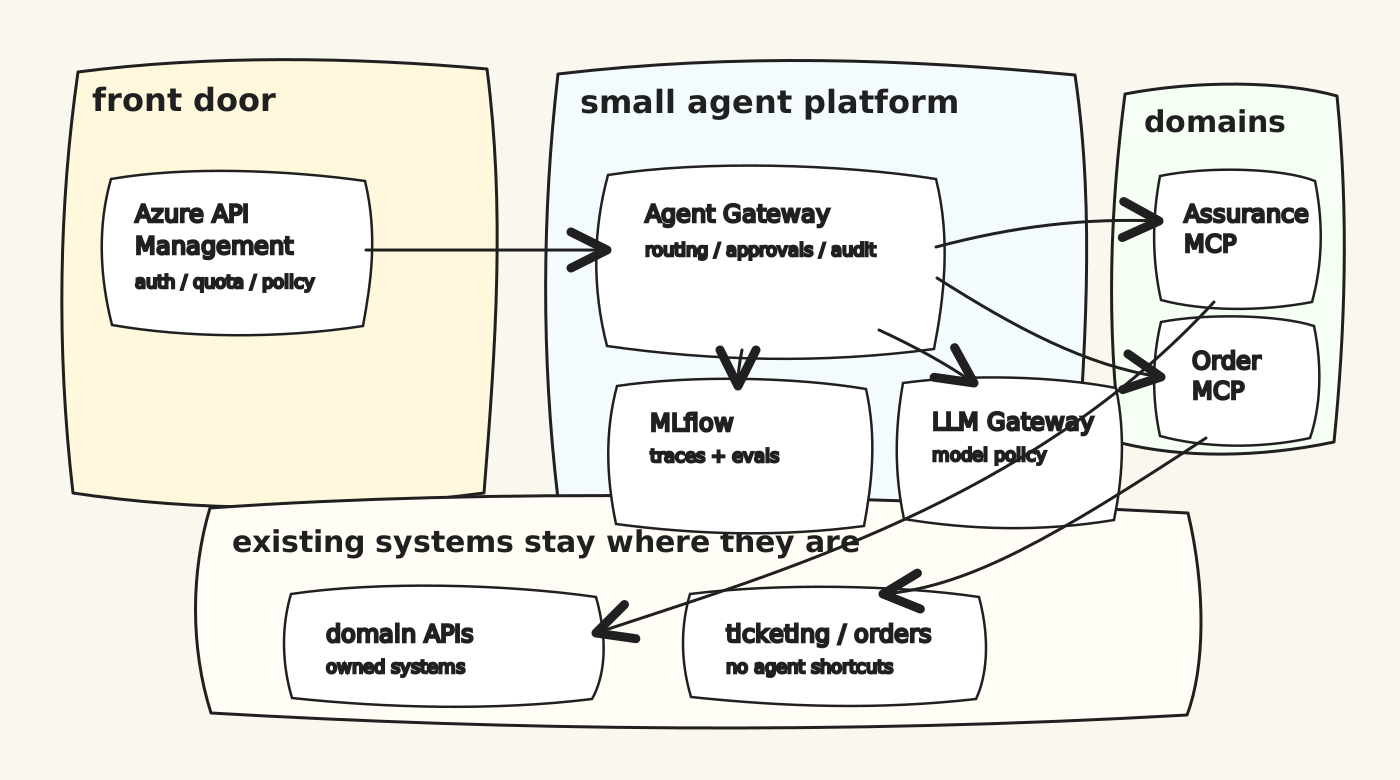
Build one small Agent Gateway. Put Azure API Management in front of it. Use domain-owned MCP servers behind it. Use MLflow from mlflow.org for AI Gateway, traces, evaluation, and feedback. Use the platform to make the path from business need to governed tool call shorter.
That is the platform.
Not a giant AI program. Not an internal chatbot carnival. Not an excuse to generate more code than anyone can own.
A small, boring, governable execution path for agents that need to touch real systems.
More code does not remove the bottleneck
This is the trap in a lot of enterprise AI thinking:
“If agents can write code, delivery will become cheap.”
Some delivery will become cheaper. Scaffolding, tests, adapters, examples, documentation, migration scripts, and repetitive glue code will all get faster.
But the hard parts of enterprise delivery are rarely just typing code.
The hard parts are:
- Which domain owns the capability?
- Which API is the source of truth?
- Which user is the agent acting for?
- Which data is allowed to leave the system?
- Which action needs human approval?
- Who reviews a failed tool call?
- What happens when downstream systems disagree?
- How does security replay what happened?
- How does the second team reuse the pattern without copying the first team’s shortcuts?
More generated code can actually make those bottlenecks worse. Every team can generate its own connector, its own policy, its own logging, and its own version of “temporary” integration. That looks like acceleration from inside a sprint. From the enterprise view, it is just faster fragmentation.
The useful goal is not code generation.
The useful goal is bottleneck removal.
That is why the architecture needs APIM, an Agent Gateway, domain-owned MCPs, and MLflow-style trace/eval loops. Not because those boxes are fashionable. Because they remove different bottlenecks:
- APIM removes the “how do we expose and govern this safely?” bottleneck.
- The Agent Gateway removes the “who can use which agent/tool/action?” bottleneck.
- Domain MCP servers remove the “who owns this integration surface?” bottleneck.
- MLflow, the open-source project from mlflow.org, removes the “how do we learn from real runs without guessing?” bottleneck.
- Tool contracts remove the “what exactly does this tool do and what can go wrong?” bottleneck.
The shape I would build first
I would not start by asking which agent framework should win.
I would start with the bottleneck map.
Where does the work get stuck today?
- waiting for another team to expose an API
- waiting for security to approve a new integration path
- waiting for someone to clarify who owns a business rule
- waiting for manual checks across five systems
- waiting for someone to turn a diagnosis into an incident
- waiting for an audit answer after something went wrong
Those are the constraints the platform should remove.
And the first bottleneck to remove is usually ownership.
The first useful question is: which domain owns the action?
If the tool diagnoses a customer service, that belongs to the assurance domain. If it checks an order, that belongs to the order domain. If it opens a ticket, that belongs to the service-management domain. The MCP server should follow that ownership line.
That sounds obvious, but it is where many agent architectures go wrong. They build one big “AI tools service” owned by the AI/platform team. It wraps everything. It knows too much. It grows too quickly. After a while, nobody knows whether business rules live in the original system, the MCP wrapper, the prompt, or the agent’s workflow code.
That is exactly the mess domain-driven design was invented to avoid.
An MCP server should be a domain capability surface, not a bag of endpoints.
%%{init: {"look": "handDrawn", "theme": "base", "themeVariables": {"fontFamily": "Comic Sans MS, Virgil, Arial", "primaryColor": "#fff8dc", "primaryBorderColor": "#333", "lineColor": "#333"}}}%%
flowchart LR
  user["operator<br/>technician<br/>case worker"]
  ui["thin AI UI"]
  apim["Azure API Management<br/>auth, policy, quota"]
  gateway["Agent Gateway<br/>routing + approvals"]
  mlflow["MLflow<br/>mlflow.org<br/>traces + evals"]
  llm["MLflow AI Gateway<br/>model routing + cost"]

  subgraph mcp["domain MCP servers"]
    assurance["Assurance MCP"]
    order["Order MCP"]
    service["Service Mgmt MCP"]
  end

  subgraph systems["existing systems stay owned"]
    inventory["Inventory"]
    network["Network APIs"]
    tickets["Ticketing"]
    orders["Order APIs"]
  end

  user --> ui --> apim --> gateway
  gateway --> llm
  gateway --> mlflow
  gateway --> assurance
  gateway --> order
  gateway --> service
  assurance --> inventory
  assurance --> network
  order --> orders
  service --> tickets
This is deliberately not fancy.
The expensive parts of agent platforms are not the boxes. They are the consequences of putting the wrong responsibilities in the wrong boxes.
Azure API Management belongs at the front
If the company already has Azure API Management, use it.
Do not rebuild the front door in the Agent Gateway.
APIM is good at the things that should be boring:
- validating JWTs or Microsoft Entra tokens before traffic reaches the backend
- applying rate limits and quotas
- enforcing subscription/product access
- attaching policy to API or MCP surfaces
- emitting monitoring data through the Azure stack
- giving teams a known API governance pattern
Microsoft is also clearly moving APIM toward MCP governance. The current docs describe exposing REST APIs as MCP servers, selecting which operations become tools, associating those MCP servers with APIM products, and applying APIM policies to the resulting tools.
That matters.
It means MCP does not have to live outside the API governance model. Existing REST APIs can be exposed as tools. MCP endpoints can sit behind familiar policy gates. Enterprise discovery can happen through the same platform muscle the organization already knows.
The bottleneck lesson is: spend less custom effort on gateway plumbing.
Spend more effort on tool contracts.
The Agent Gateway should stay thin
The Agent Gateway is not the place to hide every integration shortcut.
Its job is to decide:
- who is asking
- what task they are trying to perform
- which agent flow is allowed
- which MCP tools are available
- whether the action needs human approval
- which model route is permitted
- what gets written to trace and audit
Its job is not to know the deep business rules for every domain.
If a technician asks, “Why is this service down?”, the Agent Gateway may route the request to an assurance workflow. But the diagnose_service tool should live in Assurance MCP, owned by the team that understands the network, customer state, fallbacks, and failure modes.
If the same technician asks to create an incident, the Agent Gateway should recognize that this is a higher-risk action and insert an approval step. The actual incident creation should still sit behind a domain-owned tool with an idempotency key and a proper audit trail.
That split is what keeps the system cheap to grow.
It also keeps the bottleneck visible. If a tool is slow to create because the domain cannot agree what the action means, the answer is not to let the agent improvise. The answer is to expose the disagreement and resolve the domain boundary.
Use MLflow AI Gateway, but do not confuse it with the domain gateway
MLflow, the open-source project documented at mlflow.org, is the part I would use carefully.
Actually, I would use more of it than a first sketch might suggest.
MLflow’s AI Gateway is useful for exactly the kind of budget-constrained setup this article is about. It gives you a unified endpoint for model providers, centralized key handling, endpoint configuration, usage tracking, budget controls, guardrails, and traces without asking a small team to build that plumbing from scratch.
So yes: use the MLflow AI Gateway for the model/provider side.
But I would still keep a thin domain Agent Gateway in front of the MCP execution path.
Those are different jobs.
MLflow AI Gateway answers:
- which model/provider endpoint should this request use?
- how do we centralize model credentials?
- how do we track usage, latency, token count, and cost?
- how do we apply model-side guardrails and budget controls?
The domain Agent Gateway answers:
- which business action is being attempted?
- which user or service identity is the agent acting for?
- which domain MCP tools are available in this context?
- does this action need approval before execution?
- what idempotency, audit, and rollback rules apply?
- which domain owns the tool contract when it fails?
If the platform only needs to host a simple agent endpoint, MLflow Agent Server may be enough to start. It can expose an agent as a FastAPI-backed endpoint with validation, streaming support, and built-in tracing. That is useful.
But for enterprise MCP, the hard part is usually not serving one agent. The hard part is governing tool access across domains without turning the platform team into the owner of every business rule.
That is why the domain Agent Gateway should stay small, and why the model gateway should come from MLflow instead of custom code.
MLflow is also strongest as the evidence layer around the platform:
- traces of agent runs
- tool-call spans
- prompt and model versions
- feedback and human assessments
- evaluation datasets
- regression checks before changing tools
- latency and cost comparisons
The official MLflow MCP server from mlflow.org is aimed at interacting with MLflow traces programmatically. That is useful, but it is not the same thing as a complete enterprise domain gateway for MCP tool entitlement, approvals, and business-action routing.
So the better budget architecture is:
- APIM as the enterprise front door
- MLflow AI Gateway for model/provider routing, credentials, usage, cost, and guardrails
- a small custom Agent Gateway for domain runtime policy and MCP orchestration
- MLflow tracing/evaluation from mlflow.org for improvement loops
- domain MCP servers for owned capabilities
This gives you a learning system without pretending the model gateway is the whole domain runtime.
The first version should be almost embarrassingly small
The right first release has one domain and three tools.
Pick a painful workflow. Technician support is a good candidate because the value is obvious: fewer manual lookups, faster diagnosis, better incident quality.
Start with:
- one read-only tool
- one diagnostic tool
- one write/action tool that requires confirmation
Example:
domain: Assurance
mcp: assurance-mcp
tools:
  - name: get_customer_service_summary
    risk: low
    scope: assurance:read
  - name: diagnose_service
    risk: medium
    scope: assurance:diagnose
  - name: create_incident
    risk: high
    scope: assurance:incident:create
    requiresApproval: true
That is enough to prove the model.
If those three tools cannot be built with clean ownership, policy, trace, and approval, adding twenty more tools will not fix it. It will just make the confusion harder to see.
A practical request flow
%%{init: {"look": "handDrawn", "theme": "base", "themeVariables": {"fontFamily": "Comic Sans MS, Virgil, Arial", "primaryColor": "#f7fbff", "primaryBorderColor": "#333", "lineColor": "#333"}}}%%
sequenceDiagram
  participant User
  participant UI as AI UI
  participant APIM as Azure APIM
  participant AG as Agent Gateway
  participant LLM as MLflow AI Gateway
  participant MCP as Assurance MCP
  participant API as Domain APIs
  participant Trace as MLflow

  User->>UI: "Why is this service failing?"
  UI->>APIM: request with user token
  APIM->>APIM: validate token + quota
  APIM->>AG: forward with correlation id
  AG->>Trace: start run trace
  AG->>LLM: classify task + plan through governed model route
  AG->>MCP: diagnose_service
  MCP->>API: read owned systems
  API-->>MCP: typed result
  MCP-->>AG: diagnosis + evidence
  AG->>Trace: log tool span + outcome
  AG-->>UI: answer + next action
  UI-->>User: show result
For a high-risk action, add a stop:
%%{init: {"look": "handDrawn", "theme": "base", "themeVariables": {"fontFamily": "Comic Sans MS, Virgil, Arial", "primaryColor": "#fffdf5", "primaryBorderColor": "#333", "lineColor": "#333"}}}%%
flowchart LR
  plan["agent proposes action"]
  review["human review<br/>exact payload shown"]
  approve{"approve?"}
  tool["call MCP tool<br/>with idempotency key"]
  audit["write audit trail"]
  stop["stop safely"]

  plan --> review --> approve
  approve -->|yes| tool --> audit
  approve -->|no| stop --> audit
This is the boring control that makes agent actions acceptable in production. The model can suggest. Deterministic code decides whether the action is allowed.
What the MCP contract should contain
Every tool needs a contract that is readable by both humans and machines.
Not just a JSON schema. A real operating contract.
tool: diagnose_service
owner: Assurance
risk: medium
scope: assurance:diagnose
dataClass: customer-operational
input:
  customerId: string
  serviceId: string
  symptom: string
output:
  status: healthy | degraded | down | unknown
  likelyCause: string
  evidence:
    - source: string
      value: string
  recommendedAction: string
controls:
  approval: false
  idempotencyKey: optional
  modelDataRule: minimize_before_model
  auditPayload: metadata_plus_hash
failureModes:
  - downstream_timeout
  - missing_service
  - partial_data
This is where domain-driven MCP design becomes real.
The tool name is business language. The owner is explicit. The scope is enforceable. The data class is visible. The model is not expected to invent policy from a prose description.
The bottleneck removal plan
Week 1: find the bottleneck
Do not create a platform backlog.
Create a bottleneck card:
- user
- task
- systems touched
- three tools
- risk per tool
- data classes
- success metric
- current waiting point
Success metric should be boring and measurable: reduce manual lookups, reduce time to diagnosis, improve incident quality, reduce repeated handoffs, reduce time waiting for integration clarification.
The point is to avoid building a generic platform nobody can judge. Pick a workflow where the bottleneck hurts enough that people will care if it disappears.
Week 2: build the narrow runtime that removes it
Build only:
- APIM route
- Agent Gateway skeleton
- one MCP server
- MLflow AI Gateway endpoint for the approved model/provider route
- MLflow trace logging, using the mlflow.org project rather than a custom trace store
- one approval screen or approval event
Avoid the internal platform temptation. No giant registry UI. No multi-agent marketplace. No twenty-domain architecture diagram.
The first release should remove one real blockage in one real workflow.
Week 3: harden the controls so the removal sticks
Add:
- tool scopes
- risk classes
- correlation IDs
- idempotency keys for writes
- prompt-injection tests
- regression evals from real traces
- a simple dashboard for latency, failures, tool calls, cost, and approval rates
This is the point where MLflow earns its place. The traces from actual use become the test set for the next version.
The goal is not “we shipped an agent.” The goal is “we can see where the agent succeeded, where it failed, what it called, what it cost, and what needs to change.”
Week 4: onboard the second domain without copying shortcuts
Only add the second domain after the first one works end to end.
The second domain is the proof that the architecture is reusable. If onboarding a second MCP requires rewriting the gateway, the first version was too custom.
If onboarding the second domain is mostly a new set of tool contracts, scopes, owners, and tests, the bottleneck has moved in the right direction.
Minimum hosting
For a serious pilot, the hardware and hosting requirements are modest:
- one small container host or app service for the Agent Gateway
- one small container/app service per MCP server
- MLflow OSS from mlflow.org with AI Gateway enabled, a database backend, and artifact storage
- APIM in front
- Key Vault or equivalent for secrets
- CI/CD from GitHub
- monitoring through the cloud stack you already use
For a lab:
- 8 GB RAM works
- 16 GB RAM is comfortable
- 50-100 GB SSD is fine at first
- Docker Compose is enough
- no production data, no production secrets
The cost should go into bottleneck removal and design discipline, not compute.
What not to build
Do not build a universal call_api MCP tool.
Do not build run_sql.
Do not let a prompt decide authorization.
Do not put every domain behind one AI-owned MCP server.
Do not build your own model gateway before checking whether MLflow AI Gateway already covers the need.
Do not let MLflow become an excuse to skip domain audit design.
Do not publish remote MCP endpoints before private identity, policy, monitoring, and ownership are boring.
The early version should feel almost too controlled. That is good. You can loosen a controlled system later. You cannot easily govern a tool jungle after everyone has generated their favorite shortcut.
The real test
You know the setup is working when a new domain can add a tool without inventing a new security model.
You also know it is working when the organization stops waiting in the same places.
Ask five questions:
- Who owns this tool?
- Which user is it acting for?
- Which scope allows it?
- What happens when it fails?
- Can we replay what happened?
- Which bottleneck did it remove?
If the answers are clear, you have a platform.
If the answers are “the agent knows”, you have a demo.
And demos are cheap until they reach production.
References
- Azure API Management: expose a REST API as an MCP server
- Azure API Management: authentication and authorization overview
- Azure API Management validate-jwt policy
- Azure API Management managed identity policy
- MLflow.org
- MLflow AI Gateway
- MLflow AI Gateway for coding and long-running agents
- MLflow Agent Server
- MLflow MCP Server
- MLflow Tracing for LLM and Agent Observability
- Model Context Protocol specification 2026-07-28
- MCP 2026-07-28 specification notes